
Lofty AOS Explained: What the New Agent Operating System Means for Realtors (2026)
LOFTY AOS EXPLAINED
Yo, what up. I'm Adam Gillespie. If you use Lofty, your CRM is about to look completely different. And if you already logged in and your first thought was, dude, what the hell happened to my Lofty account, you are not alone. Lofty is rolling out a brand new experience called AOS, and it is not a normal update. This page is the full breakdown: what AOS actually is, what Cowork does, where everything you use every day moved, what the AI Copilots are, and exactly what to do on the day it lands in your account.
THE SHORT VERSION
Lofty AOS is Lofty's new agentic AI operating system. Instead of opening a dashboard and figuring out your morning yourself, you land in Cowork, a command center that briefs you on your business, flags what changed, and points at your biggest lever. Your leads, history, and settings all carry over. Nothing to download. It fully released on October 22, 2026, and every account should have it now. If yours still shows the old Lofty, log out and log back in. Which AI tools you get still depends on your plan. Learn the map first, start small with the AI, and review everything it generates before it goes out under your name.
What is Lofty AOS?
AOS stands for agent operating system, and Lofty means it literally. For years, Lofty was a giant toolbox. Your database, Smart Plans, transactions, marketing tools, websites, reporting, dialer, AI tools, all sitting there waiting for you to figure out what to do with them every single morning. You logged in, stared at a dashboard, checked your tasks, maybe looked at your pipeline, and hopefully followed up with the right people. If you were not disciplined with it, people fell through the cracks. That is just real.
AOS is Lofty trying to flip that relationship. Instead of just handing you the tools, the system itself watches what is happening in your business and helps you figure out what deserves your attention, then helps you actually do the work. Lofty announced AOS back in February as its big move toward agentic AI, and on July 28 it unveiled the expanded version built around a new home base called Cowork. It rolled out in stages over the summer, and as of October 22, 2026, AOS is fully released. Every Lofty account should have it now. If you log in and you are still staring at the old Lofty, do not panic and do not go hunting for a secret button. Log out and log back in. That is the fix, and it works.
Did my leads, history, and settings disappear?
No. Breathe. Your leads are not disappearing, your history and settings carry over, and your existing CRM data is all still there. You are not waking up one morning to an empty database and starting from scratch. What is changing, pretty dramatically, is how you interact with that database. Same business, same data, new front door. And that front door has a name.
What is Cowork, and why does it matter?
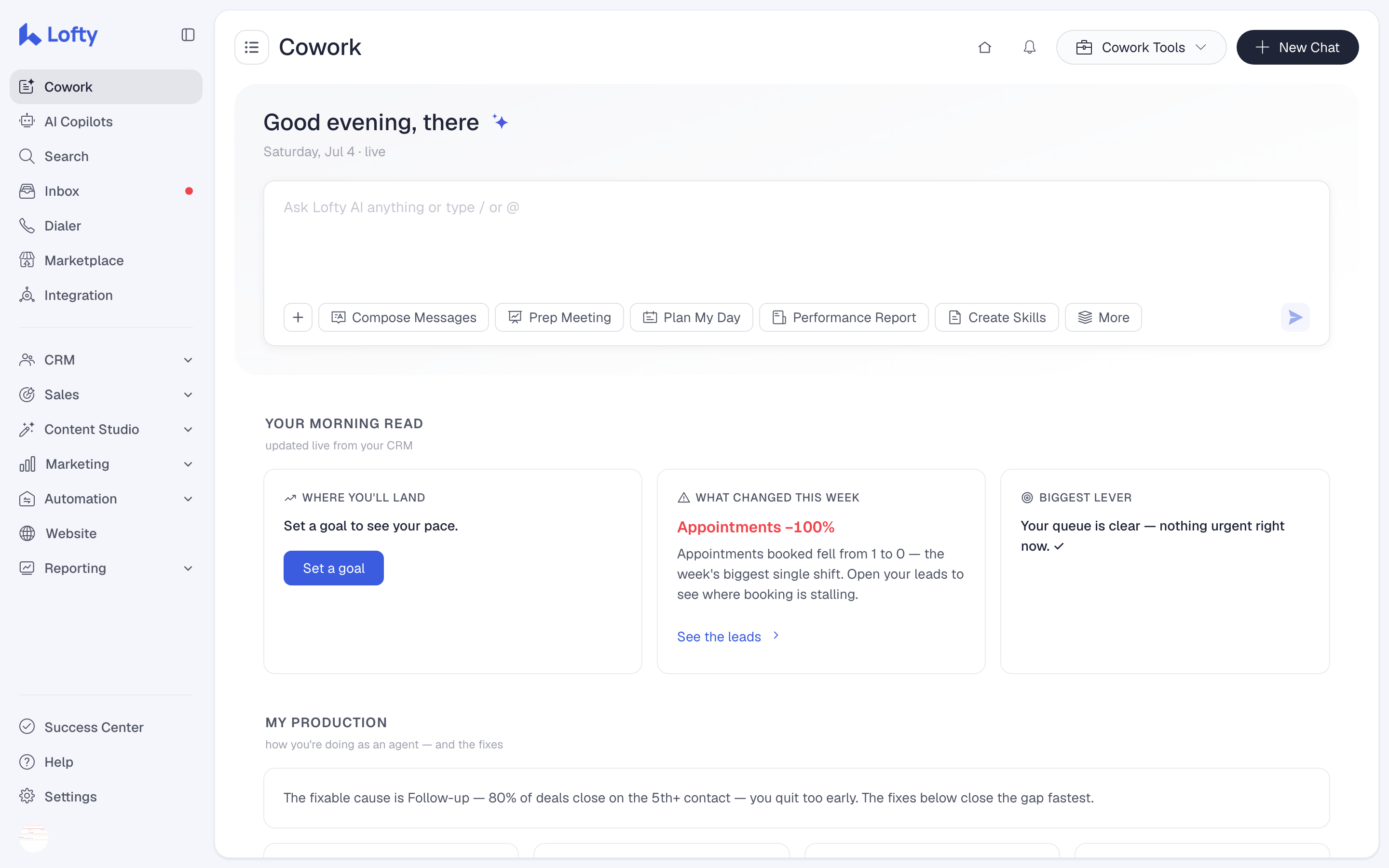
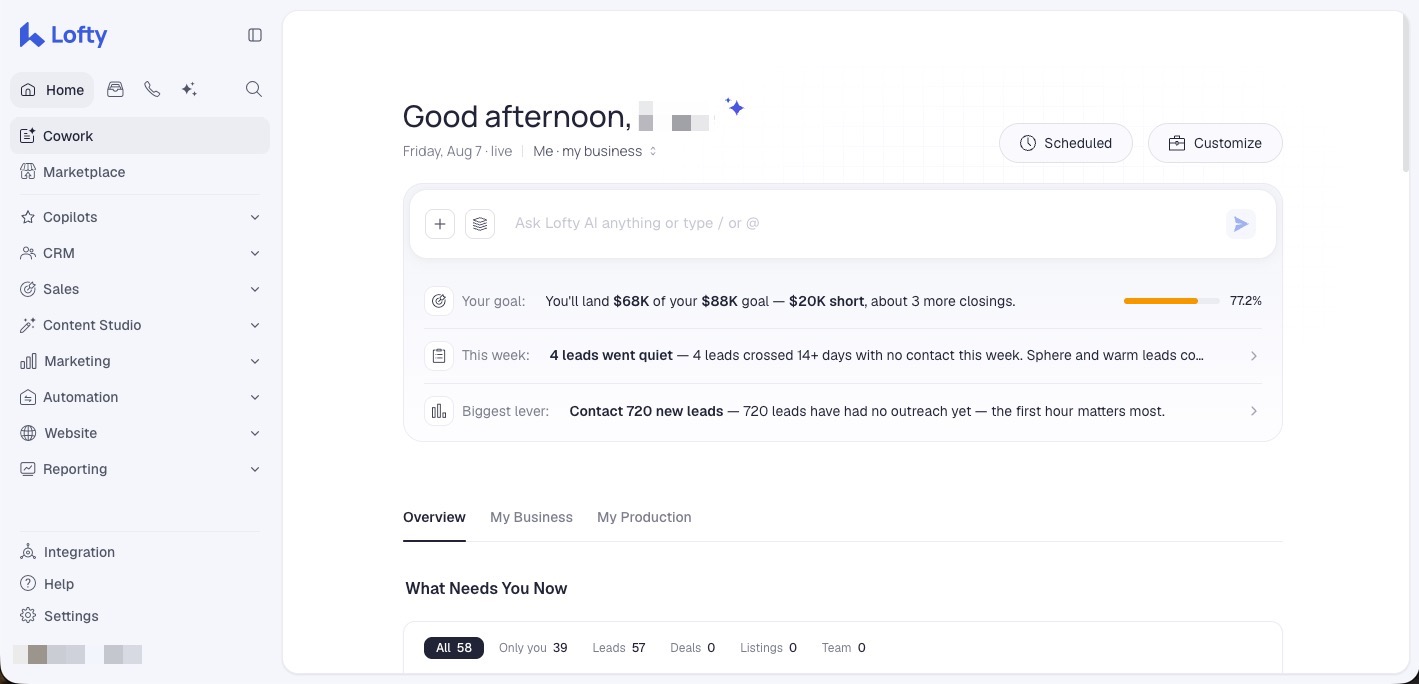
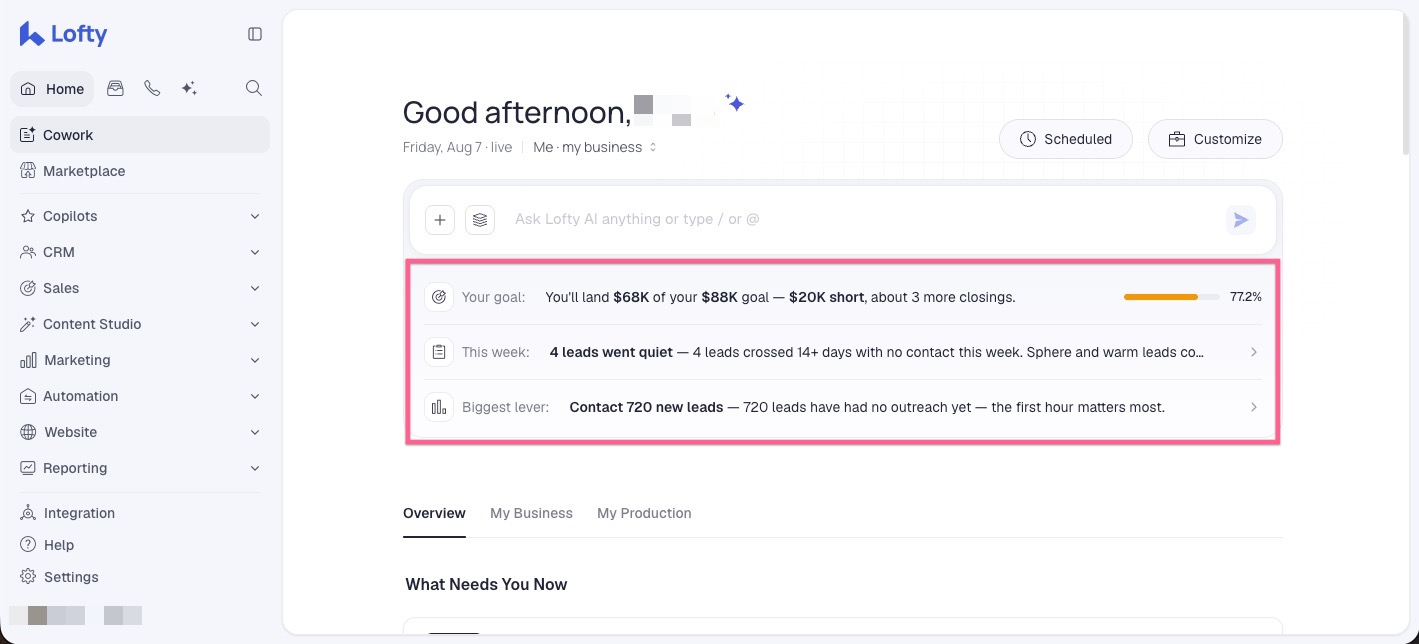
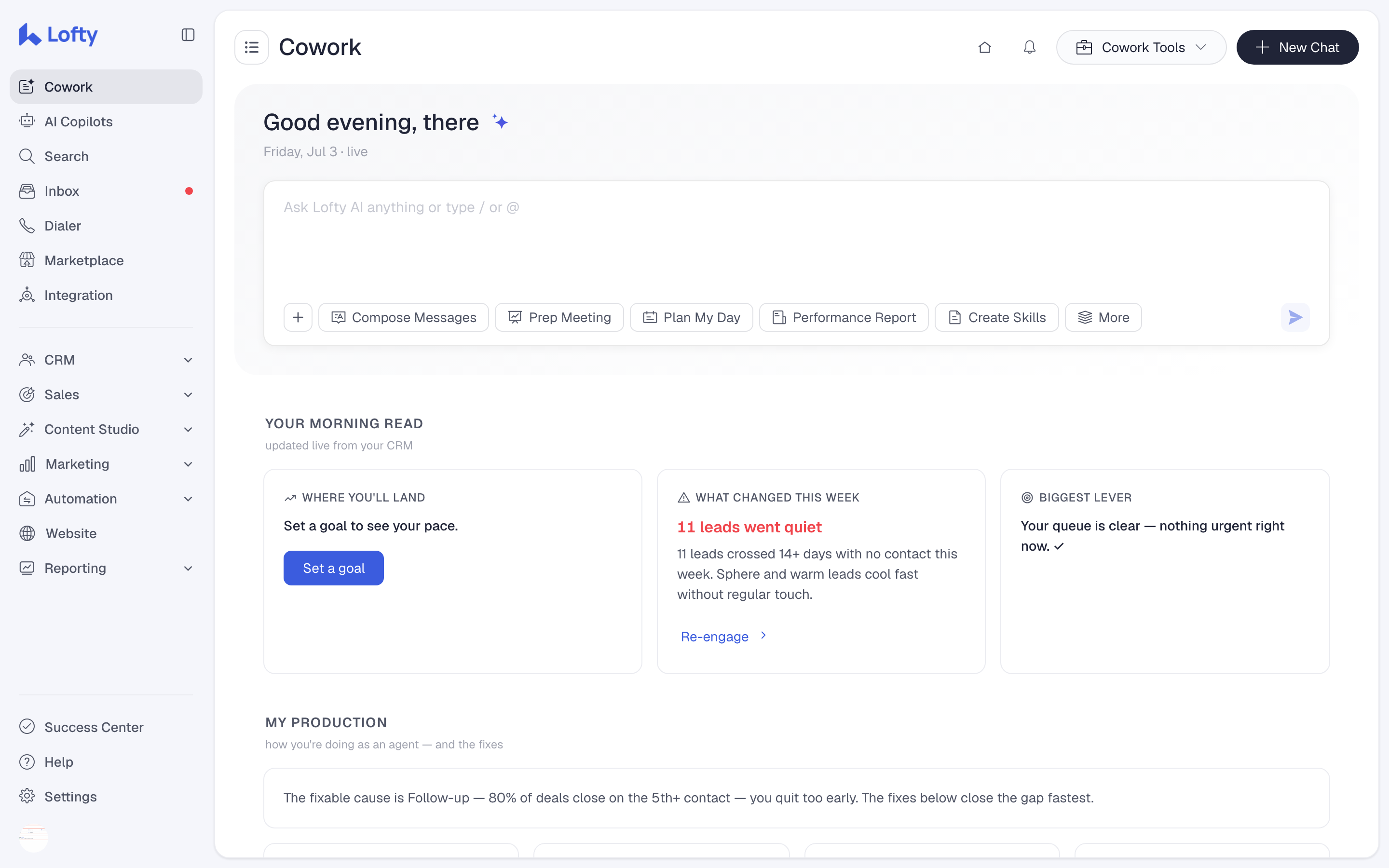
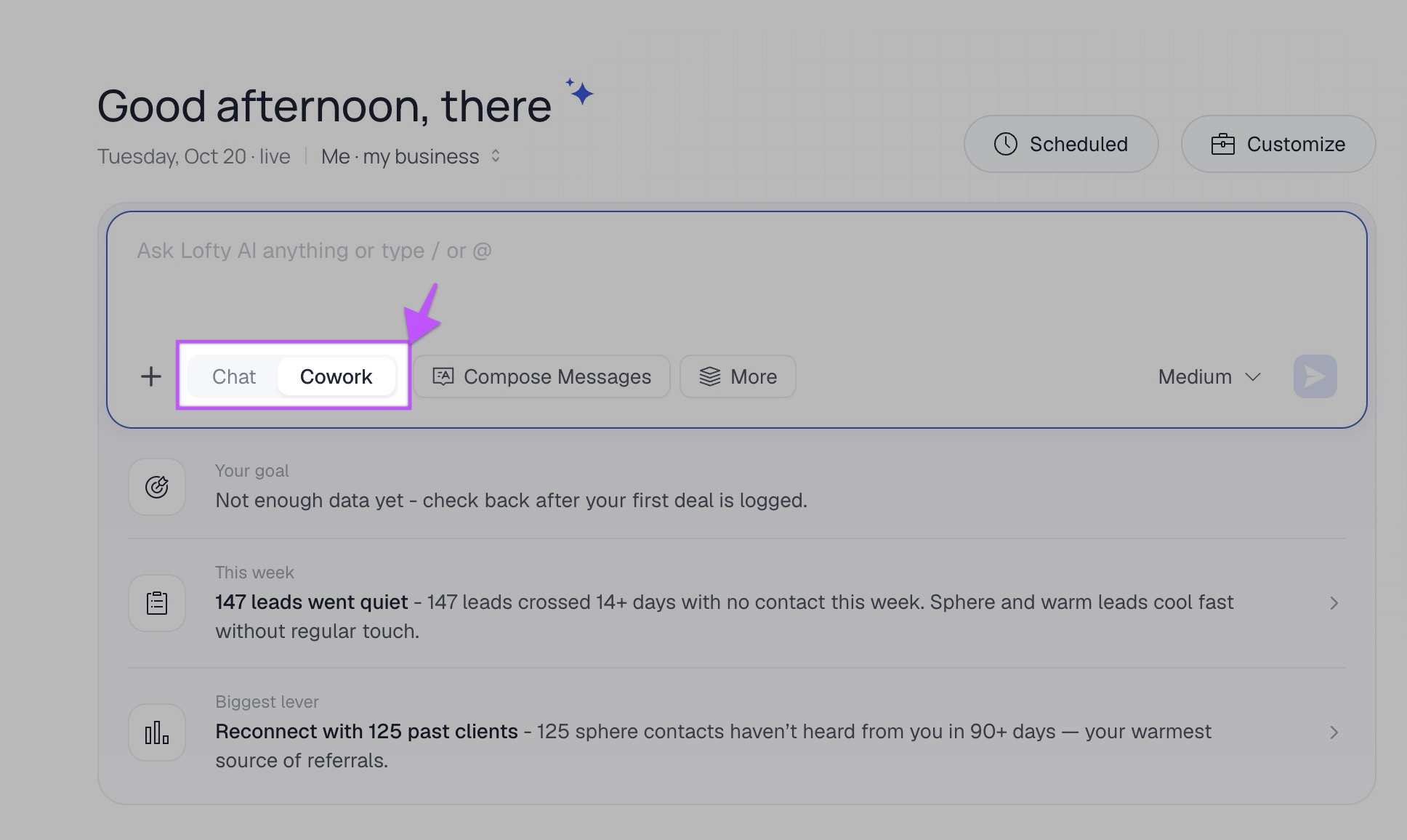
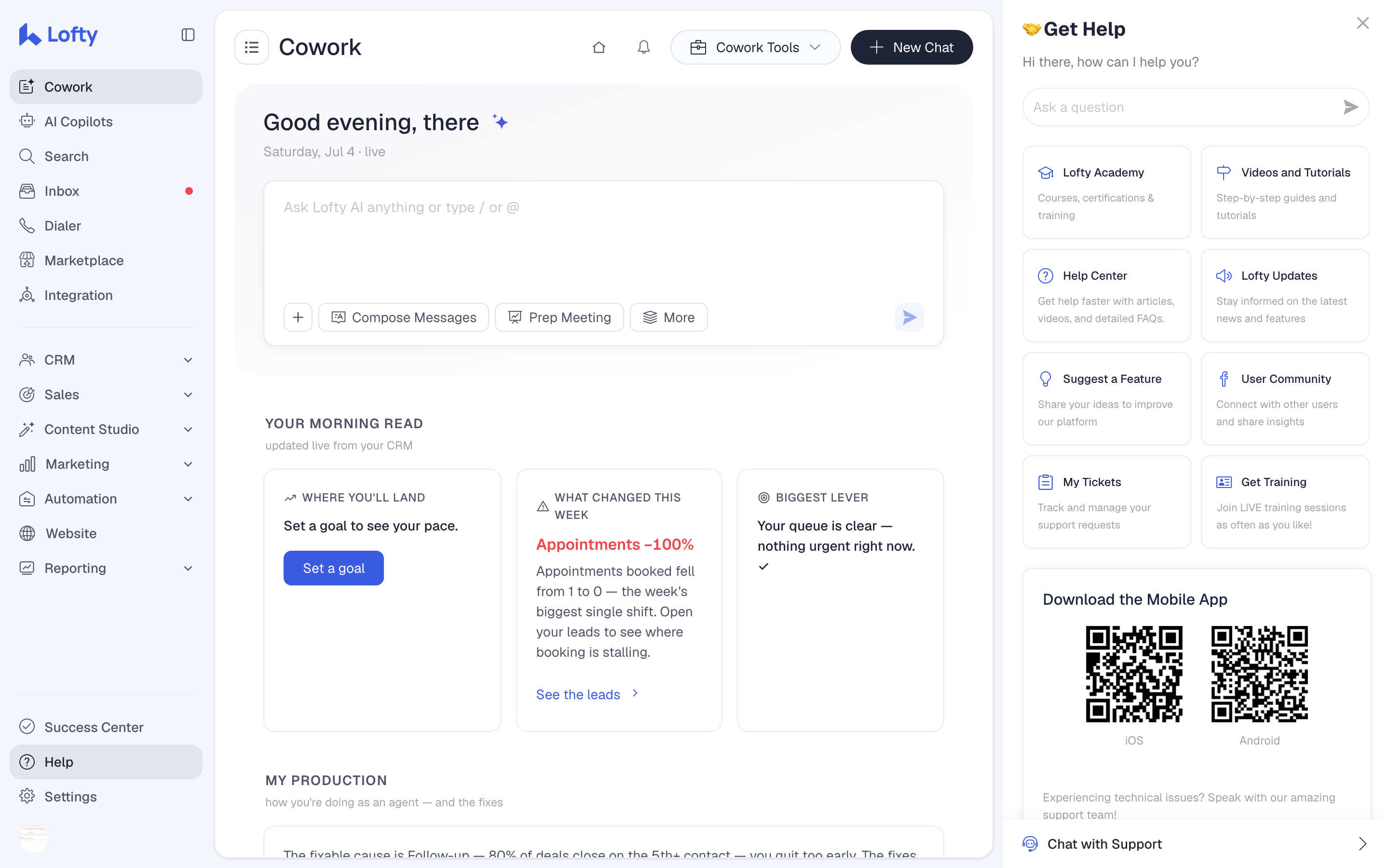
Cowork is the new command center of Lofty, and it is the single most important thing to understand about this entire update. The old dashboard is not the center of Lofty anymore. When you log in now, Cowork can give you a live brief built from what is actually happening in your CRM. It shows you where you are tracking against your goal. It tells you what changed during the week. And it identifies what Lofty thinks is the biggest lever you could pull in your business right now.
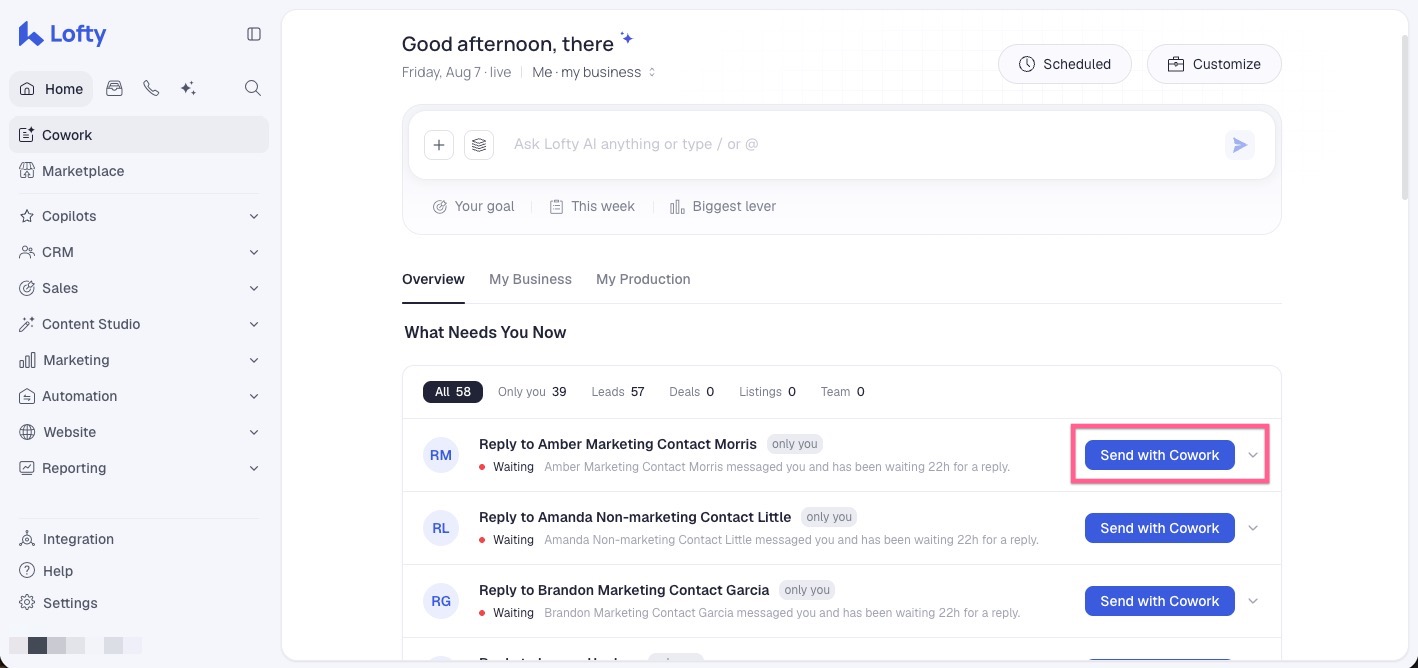
Here is Lofty's own example, and it shows you the whole philosophy in one line: 11 of your leads went quiet. Think about what that replaces. In the old CRM world, you had to know those people went quiet. You had to build a filter, run a segment, scroll through leads, and figure out who had not been contacted. Now Lofty surfaces the problem for you, and on cards like that there can be a Send with Cowork button so you can start doing something about it in the same breath. That is a major change in what a CRM is for.
Underneath the brief, Cowork goes deeper. My Production looks at your actual activity: your speed to lead, your lead to appointment conversion, your follow-up activity, and your mix of lead sources. My Business tracks the money side: your GCI against your goal, closings, and pipeline value. Instead of the CRM just storing a bunch of information, Lofty is trying to turn that information into direction.
THE BIG IDEA
The old Lofty handed you a toolbox and wished you luck. AOS tries to tell you which tool to pick up, and why, before your first cup of coffee.
What is "Ask Lofty AI Anything"?
Sitting right inside Cowork is a chat box that says Ask Lofty AI Anything, and this is where the redesign stops being a redesign. You can talk to your CRM in regular human language. Ask it questions. Use slash commands to call up specific actions. Use the at symbol to reference specific records inside your CRM. Cowork also ships with tools built in: it can help compose messages, prep you for meetings, plan your day, and build a performance report. There are tools for creating documents, working with PDFs, building presentations, and even creating reusable skills.
So do not look at AOS as a moved menu. The menu is the least interesting part of this update. Lofty is trying to get us to a point where instead of memorizing 600 clicks, you increasingly just tell the CRM what you are trying to accomplish.
How is agentic AI different from the AI you are used to?
Most AI in real estate so far is reactive. You ask for something, it responds. Write this email, summarize this call. Agentic AI is supposed to work a level up: understand the objective, look at the context around what is happening, determine what needs to happen next, and help execute the workflow. That is the shift Lofty is betting on.
And let me be clear about what it does not mean. It does not mean you hand your real estate license to a robot and go sit on a beach. You are still responsible for your business. Plenty of things require human judgment, and Lofty itself builds in controls where important actions require your approval. The system is getting more proactive. It is not getting your license. You are.
Where did everything go in Lofty AOS?
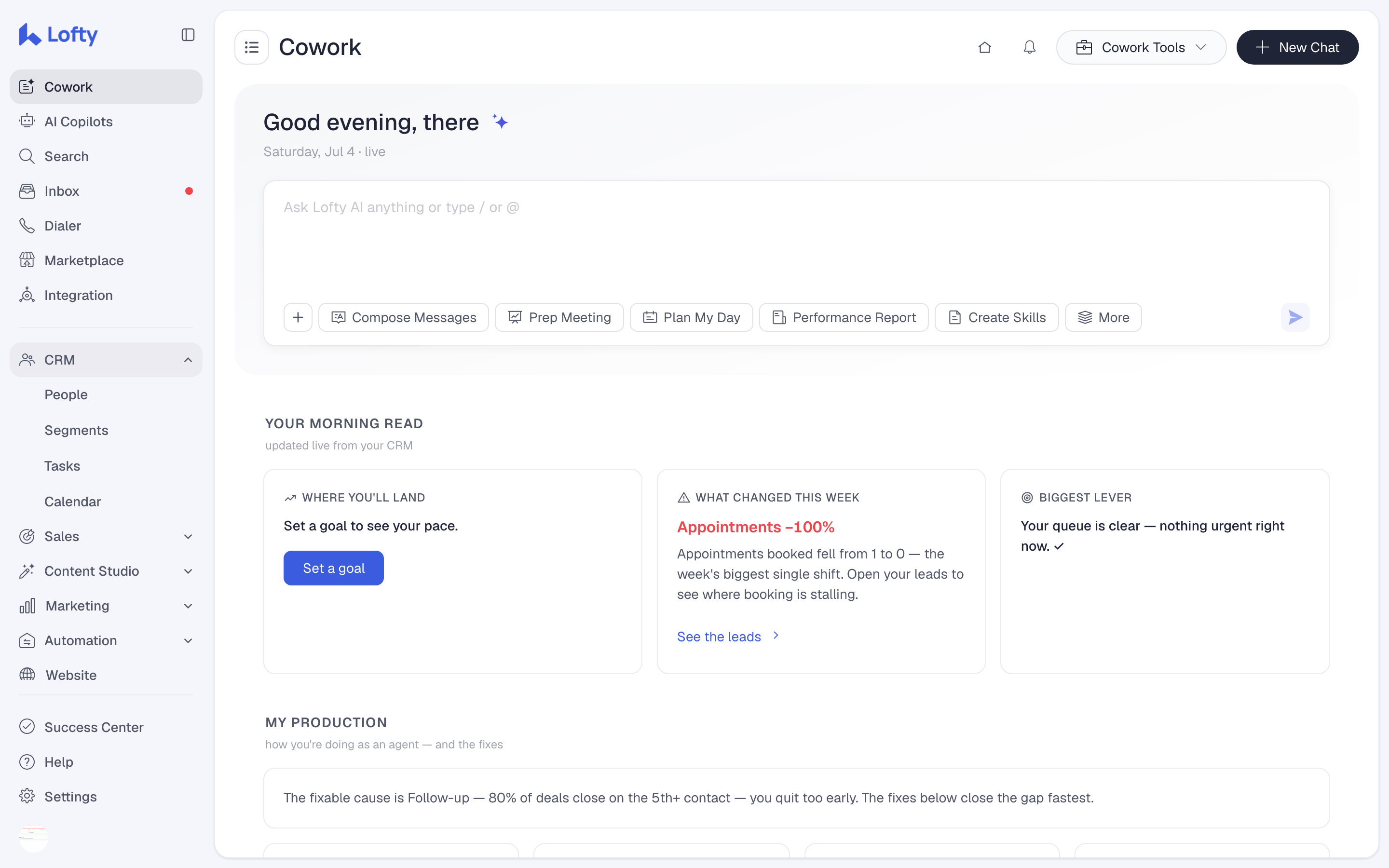
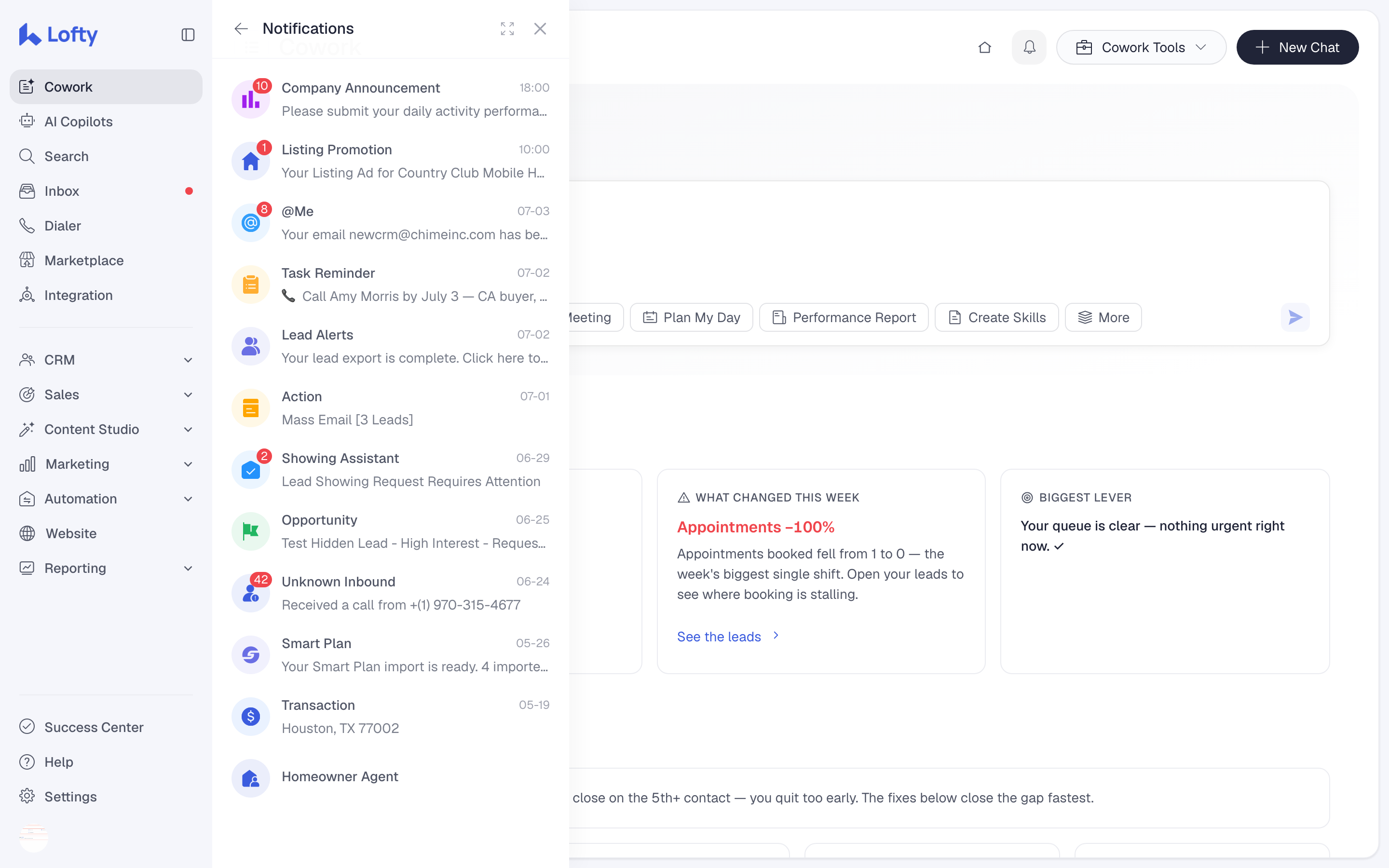
You still need the map, so here is the map. Pretty much everything now lives in a sidebar on the left side of your screen. Toward the top you will find the workspace level stuff: Cowork, AI Copilots, search, your inbox, the dialer, the marketplace, and integrations. Below that are the main areas where you actually work: CRM, Sales, Content Studio, Marketing, Automation, Website, and Reporting. Click a section and it expands to show the tools underneath it.
Your listings, showings, offers, and transactions are all grouped under Sales, like they usually were, just reached from the side instead of the top. Marketing and automation systems now have their own areas. Website tools live together. Reporting lives together. It is the same platform reorganized, and yes, there is going to be an adjustment period. If you have used Lofty for years, your brain knows where everything is without thinking. That is muscle memory, and Lofty just changed your muscle memory. Give it a week before you judge it.
What are Lofty's AI Copilots?
AI Copilots is becoming the home for Lofty's specialized AI systems, and you are going to see them everywhere inside AOS. The AI Assistant is the conversational one: it is how you talk to the CRM. The Sales Agent is what Lofty positions as a virtual ISA, built to help engage and qualify leads and work toward appointments. The Social Agent helps with social planning and creating listing content. The Homeowner Agent works the people already sitting in your database, looking for seller opportunities among your homeowners and nurturing them until the timing is right.
Now the part I will never stop saying, because it is my name and my license on the line, same as yours. Review what the AI does before it goes out. Just because Lofty can generate something does not mean you blindly approve it and send it to 5,000 people. Even Lofty's own documentation tells users to review AI generated social content before approving it. Hallucinations happen. And this is exactly why I teach agents to keep client information out of outside AI tools entirely: your clients' private details are your fiduciary responsibility, not training data. The AI should make you better at the job. It does not get to do the job unsupervised.
Why does my account look different from the videos?
I know exactly what is going to happen. Somebody watches my video, logs into Lofty, clicks AI Copilots, and says, Adam, where the hell is all this stuff you just showed me. Two reasons, and both are normal. First, the simple one. If your account still shows the old Lofty entirely, your session has not picked up the release yet. Log out and log back in. AOS fully released on October 22, so it is there waiting for you. Second, if you have AOS but something from the videos is missing, not every AI capability is included in every Lofty plan. Lofty says plainly that AI availability depends on your plan and your configuration. Some AI functionality is part of the core plans and some of it is an upgrade. You are probably not broken. This is going to be normal for a while. If you want to see what the plans themselves run, I keep the honest version on my Lofty CRM pricing page.
What should you do on day one of AOS?
1. Do not start changing a bunch of stuff. Spend a little time learning the map first. Figure out where the parts of Lofty you personally use every day have moved.
2. Go find your stuff. Your people. Your Smart Plans. Your tasks and your calendar. Your transactions. Whatever marketing tools you use regularly. Once your hands know where things are, the stress drops fast.
3. Read the Cowork brief. Look at the briefing Lofty generated from your actual business. What changed this week. What it thinks your biggest lever is. Then open My Production and see what it is actually measuring about your activity.
4. Start small with the AI. Do not try to automate your entire real estate business on day one. Ask Cowork to plan your day. Ask it to identify the leads that need attention. Have it help prep you for an appointment. Test what it can actually do.
5. Decide what stays yours. Just as important as testing the AI is learning what you still want control over yourself. That line is different for every agent. Draw yours on purpose, not by accident.
Why is AOS a bigger deal than a redesign?
Zoom all the way out. For years, the CRM industry has been in an arms race over who can give agents the most features. More automations, more reports, more marketing tools, more integrations. And the problem is most agents are not using half the stuff they already have. Another 50 buttons does not make an agent more productive. It makes them more confused. Lofty's bet is that the next evolution of the CRM is not more tools. It is giving the system enough context to help you figure out which tool you should be using right now. If they execute on that vision, it is a really big deal.
But here is the part the update cannot do for you. Your CRM still needs to be configured correctly. Your lead sources need to make sense. Your database needs to be organized. Your Smart Plans need to match how you actually follow up with people, and if yours are still the defaults, start with my Lofty Smart Plans guide. Your automations need to support your process instead of annoying everyone in your database. AOS on top of a messy system just gives you a smarter view of a mess. If you are starting from zero or rebuilding, my complete Lofty CRM training guide walks the whole system in order.
Want to watch it instead?
This page is the written version of my video breakdown, Lofty CRM Just Changed: New AOS Explained, where I walk through the thinking behind AOS. And when you are ready for the click by click tour, my full Lofty AOS walkthrough goes through the new interface top to bottom and shows you where People, Smart Plans, transactions, marketing, and settings all moved. Put it on one screen, your Lofty on the other, and follow along.
Frequently asked questions
Is Lofty AOS a separate product I have to buy or download?
No. AOS is the new Lofty experience rolling out inside existing accounts. There is nothing to download and no separate app. Individual AI capabilities inside it can depend on your plan, and some are upgrades, but AOS itself arrives as your account's new interface.
When will my Lofty account get AOS?
It already should have it. AOS fully released to every account on October 22, 2026. If your account still shows the old Lofty, log out and log back in. That refresh is what surfaces the new interface.
Did AOS delete my leads or reset my setup?
No. Your leads, history, and settings carry over. What changes is the layout and how you interact with your data, starting with Cowork replacing the old dashboard as your home base.
Where did my Smart Plans go?
They are still there, under Automation in the new left sidebar. Finding them is part of the day one map I laid out above, and my Smart Plans guide covers how to rebuild them properly once you are in.
Are the AI Copilots included in my Lofty plan?
Some AI functionality is part of Lofty's core plans and some is an upgrade, and Lofty says availability depends on your plan and configuration. If a Copilot from my video is missing in your account, that is the most likely reason.
Should I let the AI Copilots run unsupervised?
No. Review AI generated work before it reaches a client, every time. And keep your clients' private information out of outside AI tools entirely. Your name and your license are on everything that goes out.
WANT AOS WORKING FOR YOU, NOT AT YOU?
This is exactly what I do in my one on one Lofty coaching. We get inside your actual CRM together, clean up your database, fix your lead sources, rebuild your Smart Plans and automations, and set AOS up around the way you actually run your business. Four private strategy and implementation sessions a month, direct access to me, and a custom AI and CRM game plan. Not a generic course. Your system, built properly.
Book a free AI/CRM consultation
Or start with the system behind the system: my Lofty coaching and the Apex Elite AI community.
Don't panic when AOS hits your account. Your database is still there. Learn the map, start small, and keep your hands on anything with your name on it. The money is made in the follow up, and automation is key to getting your time back.


