
Lofty CRM for Teams: Routing, Roles, and Accountability That Actually Work (2026)

LOFTY CRM FOR TEAMS
Yo, what up. I'm Adam Gillespie. If you run a team on Lofty, you already know the truth nobody puts in the sales pitch. The CRM is rarely the problem. The problem is five, ten, fifty agents all doing their own thing inside one account, with leads landing wherever they land and nobody able to prove who touched what. This page is the fix. How a team Lofty account is actually structured, how routing rules decide who gets the lead, and how you see all of it as the leader without standing over anybody's desk.
THE SHORT VERSION
Lofty for teams runs on three things. Structure: a company view on top of every agent's personal view, with roles and permission profiles deciding who can see and change what. Routing: written rules that match each lead by source and type and hand it to the right agent by round robin, next up, or blast alert, with percentages you control. Visibility: reporting that shows follow up speed, response times, and activity per agent, so accountability is a number, not an argument. Get those three right and the team runs. Skip them and you bought a very expensive address book for fifty people.
What does running a team on Lofty actually mean?
A solo agent's Lofty is a notebook. A team's Lofty is an operation. Same software, completely different job. The second you add agents, the questions change. Who gets this lead? How fast did they touch it? What happens when they do not? Who can see the whole database, and who should absolutely not be able to export it?
Lofty answers those questions with structure, and this is module three of the system I teach in my Lofty CRM training guide, because it only works after your foundations are clean. Messy pipelines plus team routing equals faster chaos. So if your account setup is still a junk drawer, start there, then come back here and build the team layer on top of it.
Two views of the same CRM: company and personal
Here is the first thing I show every team leader I coach, and it surprises people every time. Inside Lofty settings there are two levels: personal and company. As the administrator of the account, you operate on both. Your personal side is your own login, your own leads, your own business. The company side is the whole operation. Every agent on the team, what role each person holds, every lead the company owns.
Why does that matter? Because most team problems are really view problems. An agent sees their personal slice and thinks the CRM is empty. You, in the company view, can see the full board: who is on the team, who holds which role, and where every company lead actually lives. When a lead goes sideways, the company view is how you find it in thirty seconds instead of playing detective in a group chat.
Roles and permission profiles: who can see what, who can touch what
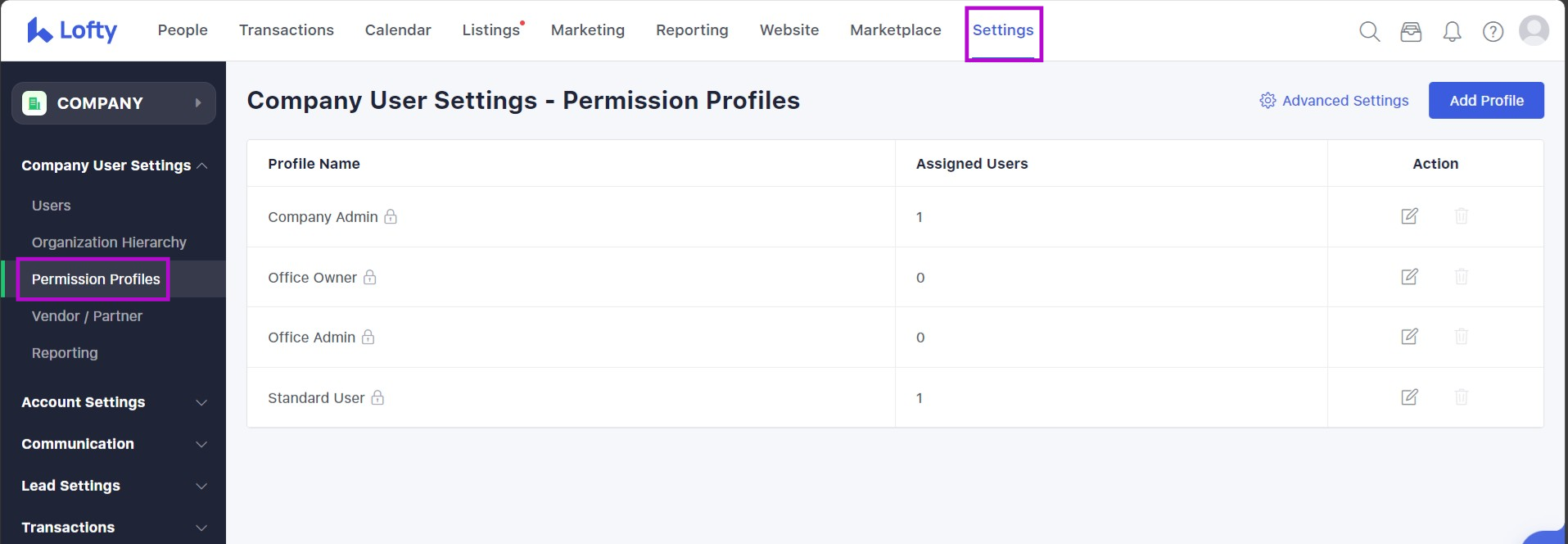
Lofty ships with built in permission profiles: Company Owner, Company Admin, Office Owner, Office Admin, and Standard User for your agents, and you can build up to twenty more of your own. Each profile is a set of switches. Can this person see all company leads, or only their office's leads? Can they manage routing rules for the whole company, or just their group? Can they export leads? Delete them? That last pair is where leaders need to slow down. Handing every agent full export rights is handing your entire database a walking-out-the-door button.
The setting I want you to notice is scope. A bunch of Lofty permissions come in two flavors: Entire Company or User's Office. That one choice decides whether your office admin runs the whole show or just their corner of it. Set profiles on purpose, per role, and your team stops stepping on each other.
Now the piece most teams never touch, and it is the bridge to routing: agent tags. You can tag agents by what they do. Buyer agent. Listing specialist. Luxury. Spanish speaking. Whatever your team actually runs on. Build agent lists off those tags, and your routing rules can send leads to a kind of agent, not just a name. An agent leaves, a new one gets tagged in, and your rules keep working. That is the difference between a system and a house of cards built on whoever happens to be employed this quarter.
Lead routing rules: the heart of a team account
Routing rules are where a team account earns its money. A routing rule is a simple sentence your CRM obeys every single time: when a lead matches these conditions, hand it to these people, this way. The conditions are the stuff you already think in. Lead source. Lead type, buyer or seller. Location or ZIP. Tags. You can stack unlimited rules, and Lofty reads them top to bottom, first match wins, so you order them most specific to most general, with a default rule at the bottom catching anything that matches nothing.
Here is the example I walk team leaders through on coaching calls. Say you have two agents who absolutely crush Zillow leads and do nothing but Zillow. You do not want those leads sprayed across the whole team. You build a rule: source is Zillow, lead type is buyer, assign to those two agents. Done. Your Zillow closers eat, your listing agents never see a lead they would have ignored anyway, and nobody can say the good leads are being hoarded, because the rule is written down and it fires the same way at 2 PM and 2 AM. Do the same for realtor.com buyers, for seller leads off your website, for each farm area you work. That is routing with intent instead of routing by whoever yells loudest.
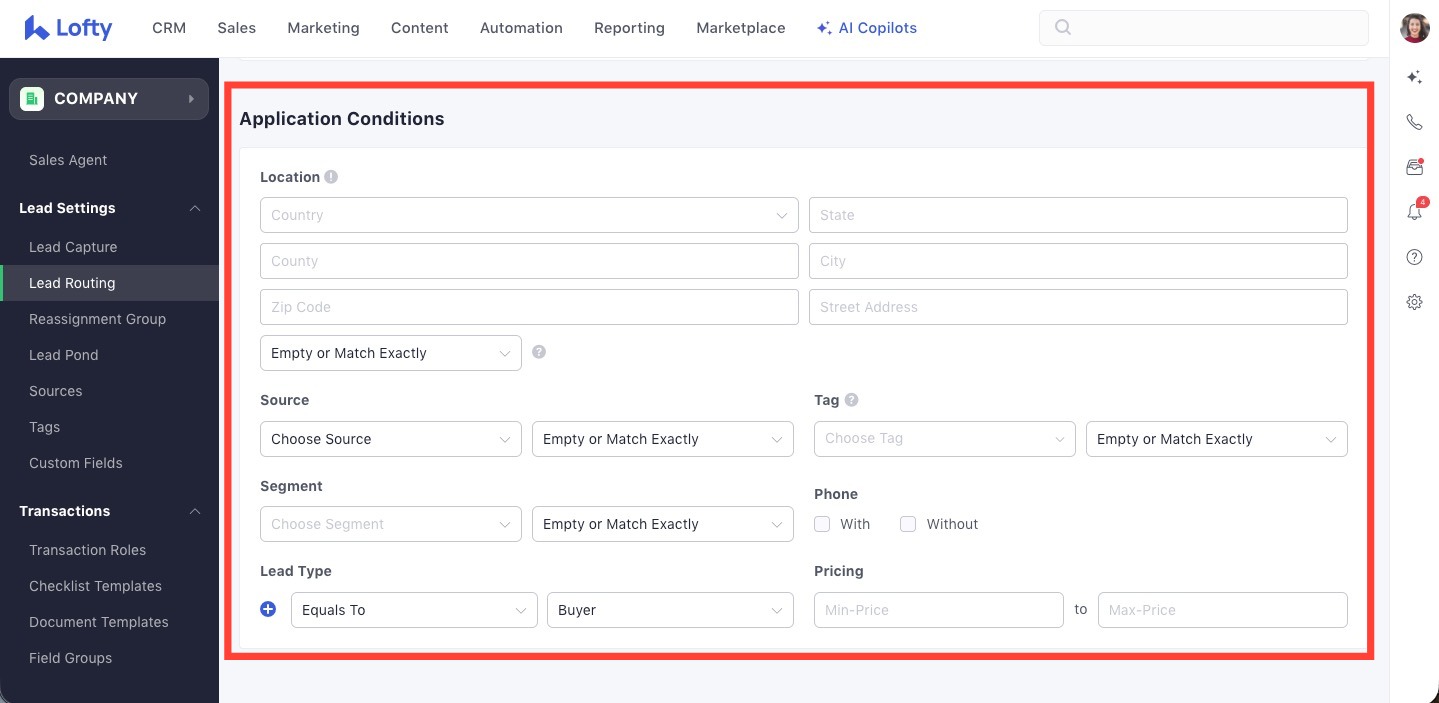
Two details worth knowing. Rules respect working hours and vacation mode, so a lead does not get assigned to somebody who is off the grid, it falls to the next rule or the default. And Lofty keeps routing logs, so when an agent swears a lead never reached them, you do not argue. You open the log and look at which rule fired and why.
Round robin, next up, or blast alert?
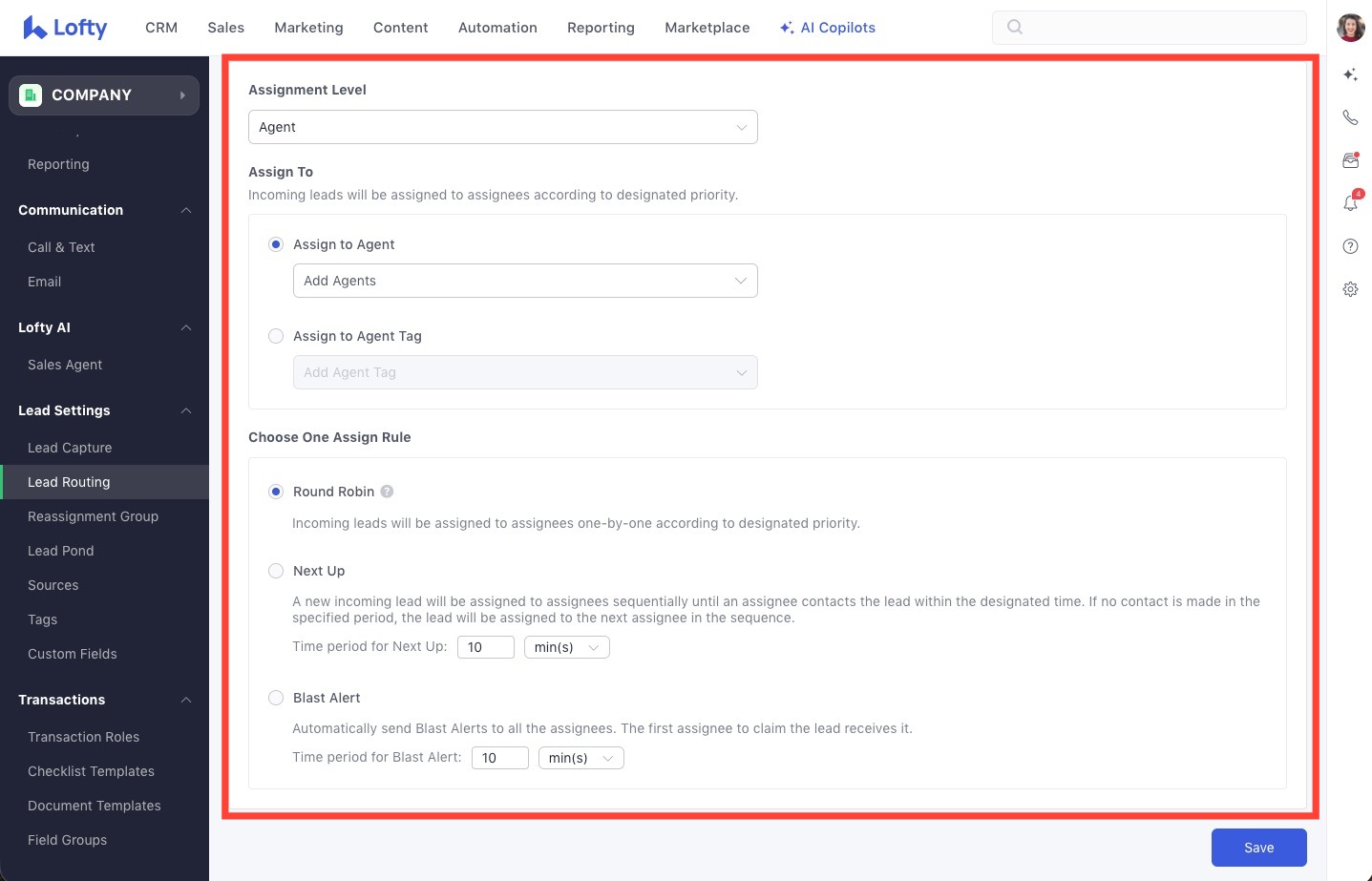
Every rule ends in an assignment method, and picking the right one is a leadership decision, not a software setting. There are three main ways Lofty hands a lead to your agents, plus sending it straight to one person or a lead pond, which I will get to.
Round robin. The lead goes to the next agent in rotation, evenly, forever. Fair, simple, predictable. Best when your agents are interchangeable and the lead type is steady. The weakness is speed: the rotation does not care if the next agent is in a closing.
Next up. The lead goes to the next available agent in a queue, and you can weight it. Best for live coverage, ISA setups, and any team where speed to lead is the whole game. This is the mode for teams that treat a new internet lead like a ringing phone, because it is one.
Blast alert. The lead goes out to a group of agents at the same time and the first one to claim it owns it. In my coaching I teach it with a clock: agents get a short window, ten minutes is a common setup, to claim before the lead falls through to the ISA or the next step. Blast creates urgency and a little healthy competition. It also creates fights if your team culture is already sideways, because the fastest thumbs win and the slow agents starve. Use it for hot portal leads. Think twice before you use it for everything.
Percentage weighting: the accountability lever nobody talks about
Inside your assignment settings you can control what percentage of leads each agent receives. Most leaders leave everybody at equal shares forever, which means your best converter and your slowest responder get fed exactly the same. That is not fairness. That is you paying for leads and lighting half of them on fire.
Here is how I teach leaders to use it, and I will give it to you straight because it works. Your reporting shows you an agent who takes two hours to call back a brand new lead. Two hours, on an internet lead that was talking to three other agents in the first five minutes. You do not fire him. You do not yell. You drop his share to 25 percent for a week and give his slice to the agents who answer. His penalty is written into the system, it is automatic, and it ends the day his response time steps up. Guys, that one move changes team culture faster than any speech you will ever give, because it ties the thing agents actually want, leads, to the thing you actually need, speed.
The lead pond: where unworked leads go to get worked
A lead pond is a shared pool. Leads sit in it unassigned, and agents on the team can pull from it and work them. Ponds are the right home for a few things: leads nobody has claimed, older leads that need a second life, and overflow when your routing rules have nowhere better to send somebody. Your default rule can even assign straight to a pond, so no lead ever lands in a dead end.
The warning that comes with it: a pond with no expectations is just a prettier junk drawer. The teams that win with ponds run a simple standard, a set number of pond leads worked every day, first come first served, and the activity shows up in reporting like everything else. Which brings us to the part leaders actually dream about.
What can a team leader actually see?
Everything, if your agents are working inside the CRM. Lofty reporting shows you follow up speed, lead response, and uncontacted leads, the three numbers that tell you whether your lead flow is healthy or bleeding. You get agent activity across the team, who is leading, what their activity is against the goal you set, and those goals can be based on activity or on results. You get call accountability, email accountability, text accountability, and performance by agent, including how long each agent is taking to respond.
Here is how I tell leaders to use it. You already run a weekly team meeting, right? Put last seven days of agent activity on the screen. Here is where we are. Here is who is leading. Here is where we pick up the pace. No callouts based on vibes, no he said she said. The numbers are sitting right there, and every agent on the team can see the same board you see. That is accountability without micromanaging, and it is exactly why module six of my training system is reporting. If you cannot see it, you cannot fix it.
The one rule that makes all of this work
None of the above survives contact with a team that works outside the CRM. If an agent gets a lead in Lofty, calls it from their personal cell, and never logs anything, your reporting shows an agent doing nothing and a lead going cold. The system cannot see work it was never told about.
So every team I coach runs some version of this rule: work your company leads on your Lofty number, inside Lofty, or the leads stop. Your own personal leads, do what you want. Company leads that the team paid for get worked where the team can see them. It sounds strict until you flip it around. The agents who work in the open are the same agents the reporting defends when a leader asks who is actually producing. And it is why your follow up system has to be identical across the team, which is the whole point of standardized Lofty Smart Plans. One team, one set of plans, no freelancing.
Team setup mistakes I see over and over
No routing rules at all. Leads hit the default rule or get hand assigned by whoever is near a screen. Your best leads deserve better than office folklore.
Blast alert for everything. Every lead becomes a thumb war. Your methodical agents, the ones who work a lead properly for months, quietly starve while the fastest clicker eats.
Permissions left wide open. Everybody can export, everybody can delete, everybody can see everything. You will not know why that was a mistake until the day it is one.
Equal percentages forever. Covered above. Equal shares regardless of response time is a subsidy for your slowest agent, paid for by your best one.
Software first, adoption never. A team rollout with no training and no work-in-the-CRM rule is just new software for people to ignore together. And if your team is on the new interface now, my Lofty AOS explainer walks through where everything moved, Cowork included.
Who this is for, and who it is not for
This is for team leaders and rainmakers who are done being the routing rule themselves, answering "who should get this one" forty times a week. It is for offices adding agents and realizing the spreadsheet era is over. It is not for anyone who wants the software to fix a culture problem by itself. Lofty will enforce whatever standards you set. It will not invent standards for you.
Questions team leaders ask me about Lofty
How does lead routing work in Lofty for a team?
You write rules, and Lofty checks every incoming lead against them in order, top to bottom. A rule matches on things like lead source, lead type, location, and tags, and then assigns the lead by round robin, next up, blast alert, directly to one person, or to a lead pond. The first matching rule wins, and a default rule at the bottom catches anything that matches nothing, so no lead falls through the floor.
Can I control what percentage of leads each agent gets?
Yes. Assignment weighting lets you set each agent's share of a rule's leads. Leaders I coach use it as an accountability lever: agents who respond fast keep their full share, and a slow responder can be dropped to a smaller percentage, like 25 percent for a week, with their slice going to the agents who answer, until their response time steps back up.
What is a lead pond in Lofty?
A lead pond is a shared pool of unassigned leads that agents on your team can pull from and work. Teams use ponds for unclaimed leads, older leads that deserve a second life, and overflow. Your default routing rule can assign straight to a pond so a lead never dead ends, and pond activity shows up in reporting like everything else.
What can a team leader see in Lofty reporting?
Follow up speed, lead response, and uncontacted leads at the team level, plus agent activity and performance by agent: calls, emails, texts, activity against goals you set, and how long each agent takes to respond. It only reflects work done inside the CRM, which is why the teams I coach work company leads on their Lofty number.
How much does Lofty cost for a team?
Lofty is quote based, and team pricing moves with your plan, your seat count, and your add-ons, so anybody who gives you one flat number without asking about your team is guessing. I break down the reported ranges and what drives them in my Lofty CRM pricing guide, and if you want your exact number, that is a strategy call, not a web page.
Go deeper on the rest of the system: the Lofty CRM training guide covers the full sequence this page sits inside, and the Lofty Smart Plans guide covers the follow up your whole team should be running.
Want your team running Lofty like a system?
That is what we build inside Apex Elite AI every single week. The full Lofty training library, both weekly calls, and a community of agents and team leaders building the same systems. Come build with us.
Join the Apex Elite AI Community
Running a team and want it built with you? See how coaching works.
The money is made in the follow up, and automation is key to getting your time back. Let's go get it.
Adam Gillespie, Apex Elite AI


